
Download CPUmade – AI‑Powered Custom T‑Shirt Design Tool
Overview
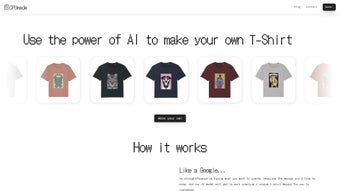
CPUmade is a next‑generation, AI‑driven web application that transforms the way you create personalized apparel. Instead of juggling complex graphic‑design software, you simply describe the visual you have in mind—think “vintage astronaut riding a neon dolphin”—and the platform’s deep‑learning engine instantly generates a high‑resolution mockup ready for tweaking. The tool is built for creators of every skill level, from hobbyists sketching a one‑off gift to budding fashion entrepreneurs launching a full‑scale line.
After the AI renders a design, you can fine‑tune colors, choose from an extensive palette of garment styles, and select exact sizes before adding the item to a secure checkout cart. Beyond the design studio, CPUmade hosts a vibrant community where users browse trending creations, filter by popularity, and follow favorite designers for real‑time updates. The platform also supports an affiliate program, rewarding early‑career creatives who promote the service and drive sales.
All of this runs in a browser, meaning no downloads, no installations, and no operating‑system constraints—just a fast, secure, and responsible AI experience that puts fashion design at your fingertips. Whether you are looking to produce a single custom gift, test a brand concept, or scale a small boutique, CPUmade offers a seamless bridge between imagination and a tangible, wearable product.
Key Features and Benefits
- AI‑Generated Design Engine: Turn plain text prompts into detailed, print‑ready graphics in seconds, powered by a proprietary diffusion model trained on millions of fashion images.
- Live Customization Panel: Adjust colors, typography, placement, and fabric tones with an intuitive drag‑and‑drop interface that updates in real time.
- Extensive Apparel Catalog: Choose from dozens of t‑shirt cuts, fabrics, and sizes for men, women, and kids, each pre‑tested for print quality.
- Community Marketplace: Explore popular designs, filter by style or trend, and follow creators for inspiration and collaboration.
- Affiliate & Creator Program: Earn commissions by sharing your custom designs or promoting the platform; track earnings through a personal dashboard.
- Secure Checkout & Order Tracking: Integrated payment gateway with SSL encryption, PCI‑DSS compliance, and real‑time shipping updates.
- Responsive Web App: Works flawlessly on desktops, tablets, and smartphones without the need for a native install, ensuring cross‑platform accessibility.
- Comprehensive FAQ & Support: Detailed knowledge base, live chat, and ticket system covering design guidelines, printing specifications, and troubleshooting.
- Responsible AI Usage: Built‑in safeguards prevent copyrighted material misuse and ensure ethical generation of graphics.
- Regular Updates: Frequent feature releases and AI model improvements based on community feedback keep the tool fresh and competitive.
Installation & Usage Instructions
Getting Started – No Download Required
CPUmade operates entirely in the cloud, so the first step is simply navigating to cpumade.com using any modern browser (Chrome, Firefox, Safari, or Edge). Once the homepage loads, click the bright “Start Designing” button, which redirects you to the AI Prompt Builder. If you’re a returning user, you can sign in with your email, Google, or Apple ID; new users can create an account in under a minute by providing a name, email, and password. The onboarding wizard walks you through basic concepts—how prompts work, what style tags mean, and how to access the community feed—so you feel confident before generating your first design.
Creating Your First Design
In the Prompt Builder, type a clear description of the graphic you want. For best results, include style cues (e.g., “retro 80s neon”, “minimalist line art”) and any specific elements (“a fox wearing sunglasses”). After hitting “Generate”, the AI processes the request on powerful servers and returns three variations within 10‑15 seconds.
Select the one you like, then click “Customize”. The customization screen offers sliders for hue, saturation, and brightness, as well as a color picker for the t‑shirt fabric itself. You can also add text overlays, change font families, and position elements precisely using the grid overlay.
For users who already have artwork, the “Add Image” button lets you upload PNG or SVG files, which are seamlessly layered on top of the AI output, enabling mixed‑media creations.
Finalizing & Purchasing
Once satisfied, choose the garment type (crew neck, v‑neck, long‑sleeve), pick your size from the standard S‑XXL range, and add the item to the cart. The checkout page is PCI‑DSS compliant, supporting major credit cards, PayPal, Apple Pay, and Google Pay. After payment, you’ll receive an order confirmation email with a tracking link. Production typically starts within 24 hours, and most shipments arrive in 3‑5 business days for U.S. addresses; international deliveries usually take 7‑12 days. Throughout the process, a live chat widget is available for real‑time assistance, and you can also consult the help center for step‑by‑step video tutorials.
Compatibility, System Requirements, and Pros & Cons
Because CPUmade is a web‑based service, it is compatible with virtually any operating system that can run a modern browser. Officially supported environments include:
- Windows: Windows 10 and newer, with the latest versions of Chrome, Edge, or Firefox.
- macOS: macOS 11 (Big Sur) and later, using Safari, Chrome, or Firefox.
- Linux: Ubuntu 20.04+, Fedora 33+, or any distribution that supports recent Chromium‑based browsers.
- Android: Android 9 (Pie) and up, via Chrome or the built‑in Android WebView.
- iOS: iOS 13 and newer, using Safari or Chrome.
No additional plugins, Java, or Flash are required. A stable internet connection (minimum 3 Mbps) is recommended for optimal AI generation speed, though slower connections will still work with slightly longer processing times. The platform respects browser privacy settings; it works with cookie consent banners and does not track personal design data beyond what is needed for order fulfillment.
Pros
- Instant AI‑generated designs eliminate the need for graphic‑design expertise.
- Fully web‑based – no installation, updates, or storage concerns.
- Rich customization tools let you fine‑tune every element before purchase.
- Community marketplace fosters inspiration and networking among creators.
- Secure, SSL‑encrypted checkout with multiple payment options.
- Responsive design works smoothly on desktop, tablet, and mobile devices.
- Affiliate program provides a revenue stream for designers and influencers.
- Regular AI model updates improve quality and expand style options.
- Comprehensive FAQ and live chat support reduce friction for new users.
- Ethical AI safeguards protect against copyright infringement.
Cons
- Because it’s cloud‑based, offline design work isn’t possible.
- Complex prompts may require a few iterations to achieve the perfect result.
- Current garment selection is limited to t‑shirts; no hoodies or accessories yet.
- Print‑on‑demand pricing can be higher than bulk orders from traditional suppliers.
- Advanced users may miss some fine‑grained control that professional design suites provide.
Frequently Asked Questions
How does the AI generate my t‑shirt design?
CPUmade uses a proprietary diffusion model trained on millions of fashion‑related images. When you enter a text prompt, the model interprets the description, applies style cues, and produces three high‑resolution graphics that are instantly previewable. The AI respects copyright rules by filtering out protected content.
Can I upload my own artwork to combine with the AI output?
Yes. After the AI generates a base design, you can click “Add Image” to upload PNG or SVG files. The platform layers your artwork on top of the AI output, allowing mixed‑media creations.
What is the turnaround time for printing and shipping?
Standard orders enter production within 24 hours of payment confirmation. Domestic U.S. shipments typically arrive in 3‑5 business days, while international deliveries take 7‑12 days, depending on the destination.
Is there a free version of CPUmade?
CPUmade offers a free tier that allows up to three AI generations per month and basic customization. To unlock unlimited designs, premium fonts, and commercial‑use rights, you can upgrade to the paid subscription plan.
How does the affiliate program work?
Affiliates receive a unique referral link. For every purchase made through that link, the affiliate earns a 10 % commission. Payments are issued monthly via PayPal or bank transfer, with a minimum payout threshold of $50.
Conclusion & Call to Action
CPUmade bridges the gap between imagination and tangible fashion, offering a secure, AI‑powered environment where anyone can turn a simple idea into a wearable masterpiece. Its ease of use, robust community features, and ethical AI safeguards make it a standout choice for creators who want to experiment without the steep learning curve of traditional design software. Whether you’re looking to produce a custom gift, test a brand concept, or simply have fun designing quirky tees, CPUmade provides a reliable, cross‑platform solution that works on Windows, macOS, Linux, Android, and iOS. Ready to bring your vision to life? Sign up for a free account today, generate your first design, and experience the future of personalized apparel.
Rating: 4.5 / 5
Pros: Fast AI generation, intuitive customization, cross‑platform access, strong community, secure checkout.
Cons: No offline mode, limited garment types, higher per‑unit cost for small orders.



.png)



